How to install jubeatools#
This page is a guide for people who are unfamiliar with Python and with the command line.
Installing Python#
jubeatools is written in Python. Because of how Python programs work, you need to have Python installed on your machine to be able to run Python programs.
Windows#
Go to www.python.org then head over to the Downloads
section.
Download the latest version.
Open the installer
On the first page be sure the tick the box that says Add Python 3.(number) to PATH
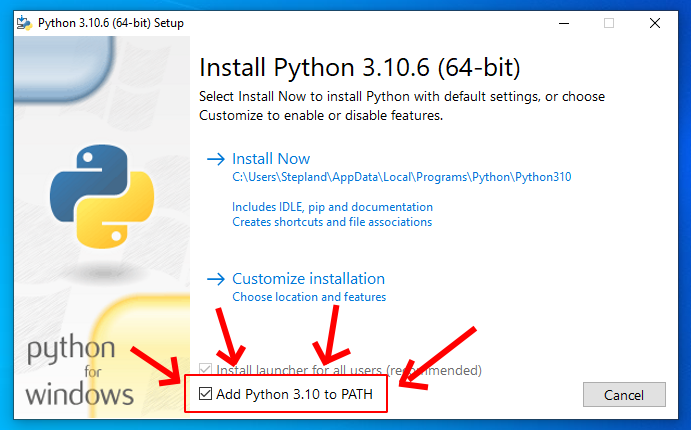
Why isn’t this on by default ?#
Click Install Now
Once it’s done, let’s check that everything went fine.
Open up any terminal (for instance you can search “cmd” in the start menu)
Once at the prompt type in py --version then hit Enter.
If everything went right it should answer back with the version number you just installed.

Here’s what it’s supposed to look like in cmd.exe#
macOS#
Use brew to install python (at least 3.9)
Linux#
Python most-likely already came installed on you computer, but depending on your chosen distribution the Python version your system ships with may be too old, jubeatools requires Python 3.9
You can check which python version you have by opening up a terminal and typing
$ python --version
or, if that doesn’t work
$ python3 --version
To install a more recent version on python on Debian and its variants you should be able to do
$ sudo apt install python3.9
If you use Fedora, Arch, or anything else, check your distro’s documentation to get the precise package name, the available versions, and the actual command you need to execute.
Installing jubeatools#
Now that Python is on your machine, we are going to use
pip, Python’s own
package manager, to download and install jubeatools.
Open up a terminal or Command Prompt, then type :
For Windows :
py -m pip install jubeatoolsFor Linux/macOS :
pip install jubeatools
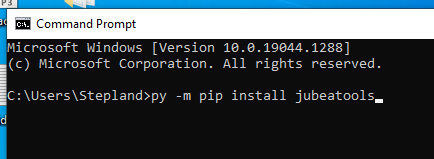
Here’s how it would look like on Windows with cmd.exe#
Hit Enter
pip is then going to blurt out the name and version of every
package and sub-package it’s installing. You don’t really need to pay much
attention to that. Just have a quick glance at the last few lines to make sure
pip says it successfully installed some packages and not that some error made
it stop.
Checking that jubeatools works#
While in a terminal or command prompt, type jubeatools --help, then hit Enter.
jubeatools should answer with something like :
Usage: jubeatools [OPTIONS] SRC DST

  Convert SRC to DST using the format specified by -f

Options:
  --input-format [eve|jbsq|malody|memon:legacy|memon:v0.1.0|memon:v0.2.0|memon:v0.3.0|memon:v1.0.0|mono-column|memo|memo1|memo2]
                                  Force jubeatools to read the input
                                  file/folder as the given format.If this
                                  option is not used jubeatools will try to
                                  guess the format
  -f, --format [eve|jbsq|malody|memon:legacy|memon:v0.1.0|memon:v0.2.0|memon:v0.3.0|memon:v1.0.0|mono-column|memo|memo1|memo2]
                                  Output file format  [required]
  --circlefree                    Use #circlefree=1 for jubeat analyser
                                  formats
  --beat-snap INTEGER RANGE       For compatible input formats, snap all notes
                                  and bpm changes to the nearest 1/beat_snap
                                  beat  [x>=1]
  --merge                         For memon, if called on a folder, merge all
                                  the .memon files found
  --help                          Show this message and exit.
If you see this help text, jubeatools is installed !
Congrats !